Setting event rules
Event rules decide when a machine raises a warning or alert. Set AI, ISO class and manual thresholds together for each measurement point, all on one screen.
Open Set Event Rules, then pick the asset and its measurement point from the tree on the left. The panel on the right shows that point's rules.
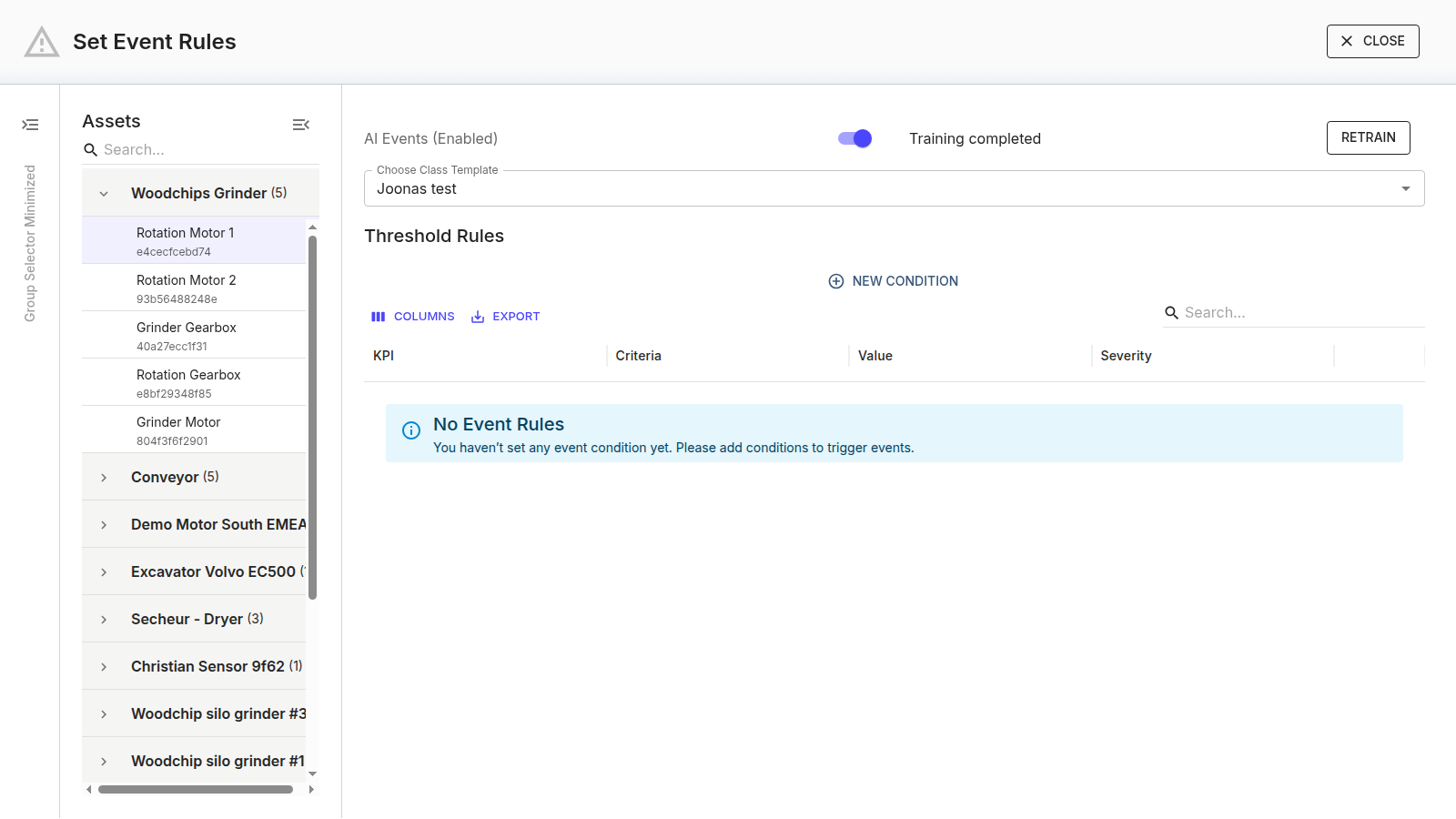
AI events

- AI Events (Enabled / Disabled) turns AI anomaly detection on or off for this measurement point.
- The status line shows where the model is — for example Training completed, or that it is still collecting data.
- Retrain rebuilds the model from a start date you choose — use it when the machine's normal behaviour has genuinely changed (see retraining).
ISO class
In the ISO Rules section, Choose ISO Class applies a standard ISO 20816 class. An ISO analysis toggle enables it, and an Event Trigger Logic setting controls how many of the last N measurements must be over the limit before an event fires. The class's Warning and Alert thresholds are set for you.
Custom class template
In the Custom Rules section, Choose Class Template applies a saved custom classification you created in Assets — the way to apply the same custom limits to many machines consistently.
Threshold rules
The Threshold Rules grid holds manual conditions specific to this point. Each row is one condition:
| Column | What it is |
|---|---|
| KPI | The measured value the condition watches (e.g. Velocity RMS, Temperature). |
| Criteria | The comparison — >, <, =, >=, <=, !=. |
| Value | The number the KPI is compared against. |
| Severity | Warning or Alert. |
Add a row with New Condition, fill in the four fields, and remove a row with its close (✕) icon (with a confirmation). A point with nothing set shows No Event Rules.
Manual threshold rules coexist with the class template and AI — any of them can raise an event, so you can pin a hard Alert limit and keep AI watching for the unexpected on the same machine.
Rules apply to the device
Saving sends the rules to the measurement point as an operation. You can follow the operation and its result in Operational Telemetry.