Large data in a Wirepas mesh network
Introduction
Working with large amounts of data, that occur when transmitting burst data from the nodes to the Treon Gateway, needs to be taken into account when planning and deploying a mesh network. While routing of scalar data is easier and has less potential to cause problems, it is possible to send raw data from your Treon Industrial Node X sensors to the Treon Gateway by planning the mesh network accordingly.
Throughput limitations
The data handling and transfer by nodes within a Wirepas mesh network is defined by several factors. Understanding the limitations of the mesh layout when it comes to large data makes it is possible to take them into account when planning the deployment.
Data type
What kind of data is used has an immense influence on the amount of data transmitted from the measurement node to the gateway through the mesh network.
Scalar data means that one message fragment contains a single measurement.
KPI measurements = 6 message fragments (a measurement on 3 axes with 2 values each = 6 messages)
Burst data means that the data from one measurement is split into several fragments and then reassembled by the backend solution.
FFT data= 600 messages per measurement Raw data = 1666 messages per measurement
Please note: All values given are valid for standard product settings!
Buffer capacity
Each Treon Industrial Node X has two dedicated data buffers.
The measurement buffer collects the sensors' own measurements until they are forwarded via the Wirepas mesh network. The buffer space for the Treon Industrial Node X is 110592 individual measurements.
Once the measurement buffer is full, the sensor node will stop any new measurement until the collected measurement data has been transmitted. This means that while the buffer is not emptied, no on-demand measurement can be triggered. If you try to trigger a new measurement while the buffer is full, you will get a message that the sensor node is occupied. Timed measurements are kept in a waiting list and are automatically postponed until the buffer is empty so the data can be stored. The next measurement after this will then be executed at the pre-scheduled time interval again.
Please note that one measurement can have varying amount of data samples, depending on the exact settings for the measurement.
Example:
A Treon Industrial Node X performs a vibration measurement every full hour (10:00, 11:00, 12:00 etc.). An OnDemand at 10:55 triggers an additional measurement at 10:55 which takes 10 minutes to transmit. The Treon Industrial Node X will execute the interval measurement at about 11:05 instead of 11:00. The next interval measure will be as scheduled at 12:00.
The routing buffer is much smaller than the measurement buffer, it’s size always depends on other activity within the mesh network at a given time. Incoming data is stored in the routing buffer until it can be routed forward within the mesh network, or directly to the gateway, depending on the exact position of the routing node within the mesh network. Usually this happens immediately.
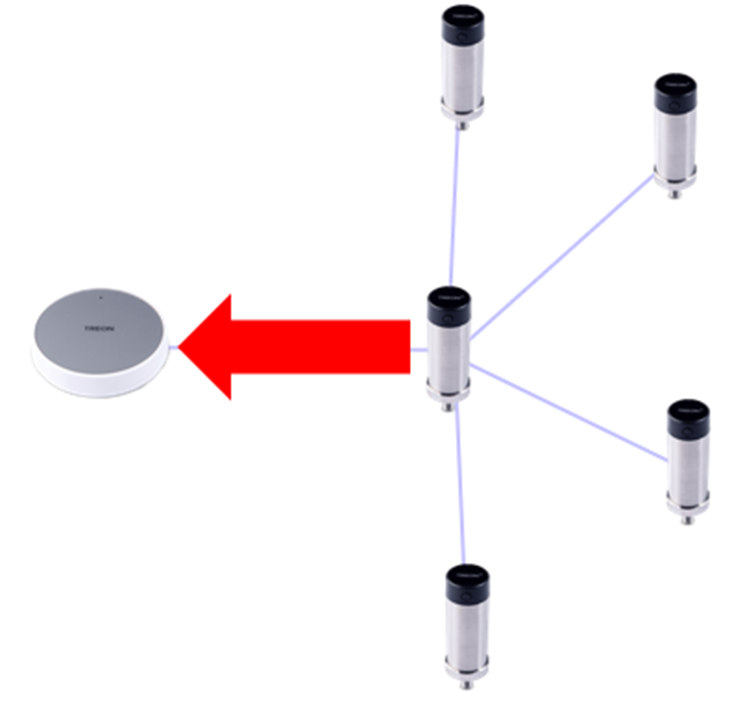
In case a node has both its own measurement data to transmit AND is routing data from other nodes, it will attempt to perform both actions at the same time. This means that limited by the total transmitting capacity, the data from both measurements will take longer to transmit. In case a single node is transmitting raw data from several nodes, data congestion can occur.
Data congestion means that data cannot be forwarded in the mesh network as nodes closer to the gateway are transferring data too slowly or not at all. This will affect the whole connected branch of the mesh network. As a result, either individual data fragments can be lost, or even whole measurements.
Periodization of data delivery
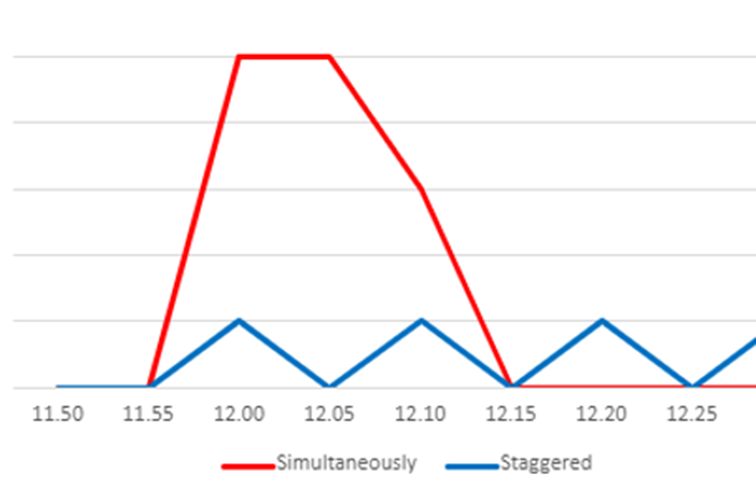
The more data is transferred from the sensor nodes to the gateway, the more likely the data buffers in the nodes can be exceeded and data loss occurs.
Triggered data staggered: less data at the same time, less likely to cause problems.
Signal Strength (RSSI)
The signal strength between the nodes in the mesh network, and between the nodes and the gateway, only have an influence on data throughput in case the link quality is bad.
You can check the signal strengths in your Treon Connect instance in the Network section.
The recommended values provided by Wirepas are the following:
| RSSI Limit | Description |
|---|---|
| >= -60 dBm | Excellent. |
| -75 dBm <RSSI <-60 dBm | Good. Recommended from here and up to ensure stability. |
| -80 dBm < RSSI < -75 dBm | Average. KPI’s will work fine. FFT and Raw data might experience issues on larger networks. Depending on the use case this setup can be stable enough. |
| -85 dBm < RSSI < - 80 dBm | Bad, unstable connection not recommended for large deployments. KPI’s will work OK, FFT and Raw data are likely to drop packages. |
| RSSI <= -85 dBm | No connection. |

Last updated on Apr 23, 2026