Treon Industrial Node X deployment strategy
Deploying the Treon Industrial Node X in an industrial environment is straightforward, but multiple factors need to be taken into consideration:
- the installation location on the monitored asset.
- the mounting methods.
- surface and environmental temperatures.
- hazardous areas.
- the layout of the whole mesh network.
General product information
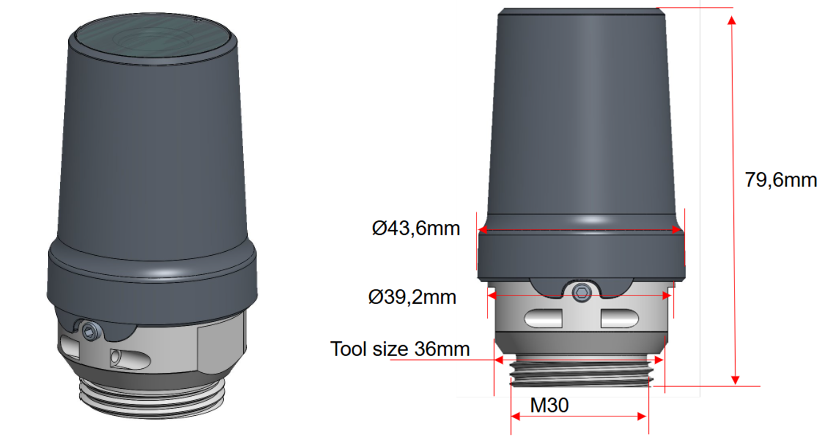
Treon Industrial Node X
- Mounting interface: M30×2.0 adapter interface.
- 30 mm direct mounting surface.
- Weight: 210g
- Environmental: IP6K9K rating.
- Temperature range: −40 to +85 °C operation temperature range.
- Sensing: tri‑axial vibration (usable up to ~6.3 kHz depending on mounting), surface temperature −40 to +85 °C.
For more information, please see the Treon Industrial Node X datasheet.
Installation location
The aim is to pick an installation location on the asset that has the best measurable vibration and temperature reading for permanent monitoring of the asset and predictive maintenance.
As a general rule, mount the Treon Industrial Node X sensor as close to the bearing load zone as feasible.
Avoid installation on thin covers or guards or loosely fastened parts that can resonate, such as for example motor fan cover. Also avoid areas where other machine parts or on-location personnel have a high chance of getting into contact with the sensor.
Do not deploy the Treon Industrial Node X to high temperatures locations over 85 °C and any other locations that might lead to sub-optimal sensor readings, damage to the sensor, and reduced battery life-time.
Always consult the assets' product documentation of the asset before installing a sensor.
Read more about choosing the best installation location.
Mounting method
There are five recommended mounting methods for the Treon Industrial Node X:
- Treon Bolt Mount Adapter mounting
- Treon Orientation Adapter mounting
- Treon Magnetic Glue Adapter for Flat Surface mounting
- Treon Magnetic Glue Adapter for Curved Surface mounting
- Direct glue mounting
Bolt mounting via the Treon Bolt Mount Adapter or the Treon Orientation Adapter are the most suitable solution for most assets.
Read our full documentation on mounting strategies for the Treon Industrial Node X.
Mesh network layout
When deploying your Treon solution, it is key to plan the Wirepas mesh network before the actual on-site installation.
The layout of the deployment environment and location of monitored assets will define the best placement for gateways and design of the whole mesh network. It is essential to plan the whole mesh network layout before the actual deployment, so all data is delivered from the sensor nodes to the Treon Connect instance smoothly.
Read our full article series on Wirepas mesh network strategies for the Treon Industrial Node X.

Last updated on Mar 24, 2026