Overview of Treon Connect for Maintenance Technicians
Introduction
Treon Connect, combined with the Treon Industrial Node C, offers maintenance technicians a powerful solution for monitoring equipment health and preventing costly downtime.
Treon Connect main features
1. Real-Time Condition Monitoring Treon Connect with the Troen Industrial Node C sensor continuously measures key vibration and temperature data from rotating and moving equipment such as motors, pumps, conveyor belts and fans. This real-time insight allows maintenance technicians to detect anomalies early, reducing the risk of unexpected failures.
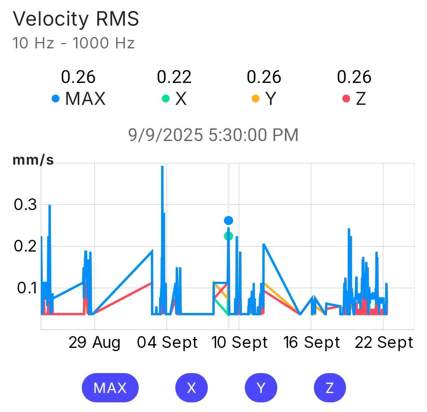
2. Long-term data comparison Treon Connect saves all collected data and makes it available to you for analysis in Treon Connect and other solutions. Use long-term data to monitor your equipment, compare maintenance cycles and establish your own equipment maintenance plan.
3. Predictive Maintenance Made Simple By using advanced algorithms, Treon Connect automatically analyzes sensor data and identifies patterns that indicate potential issues. Maintenance technicians on-site receive actionable alerts before problems escalate, enabling planned interventions instead of emergency repairs.
4. Reduced Downtime and Maintenance Costs Early detection means fewer unplanned outages and optimized maintenance schedules. Technicians can focus on critical tasks rather than firefighting, improving overall efficiency and reducing operational costs.
5. Scalable and Secure Treon Connect is easy to deploy across large facilities, ensuring all-around coverage. Data is securely transmitted and stored, giving maintenance technicians confidence in the integrity of their monitoring system.
Getting started with Treon Connect
1. Set up your account
Start by activating your Treon Connect account and downloading the Treon Connect app to your mobile device.
2. Familiarize yourself with the user interface
Next, familiarize yourself with the user interface and navigation of the Treon Connect Web app and the Treon Connect Mobile app.
3. Get to know your Assets and their sensor data
Have a look at the Assets you have been assigned and how to read the sensor data in Treon Connect Web and Treon Connect Mobile.
4. Learn how to deal with warnings and alerts
Prepare for the first alert or warning to happen and familiarize yourself with Events in Treon Connect.
5. Trigger measurements
When needed you can trigger additional measurements from the sensors monitoring your Assets.

Last updated on Dec 10, 2025